
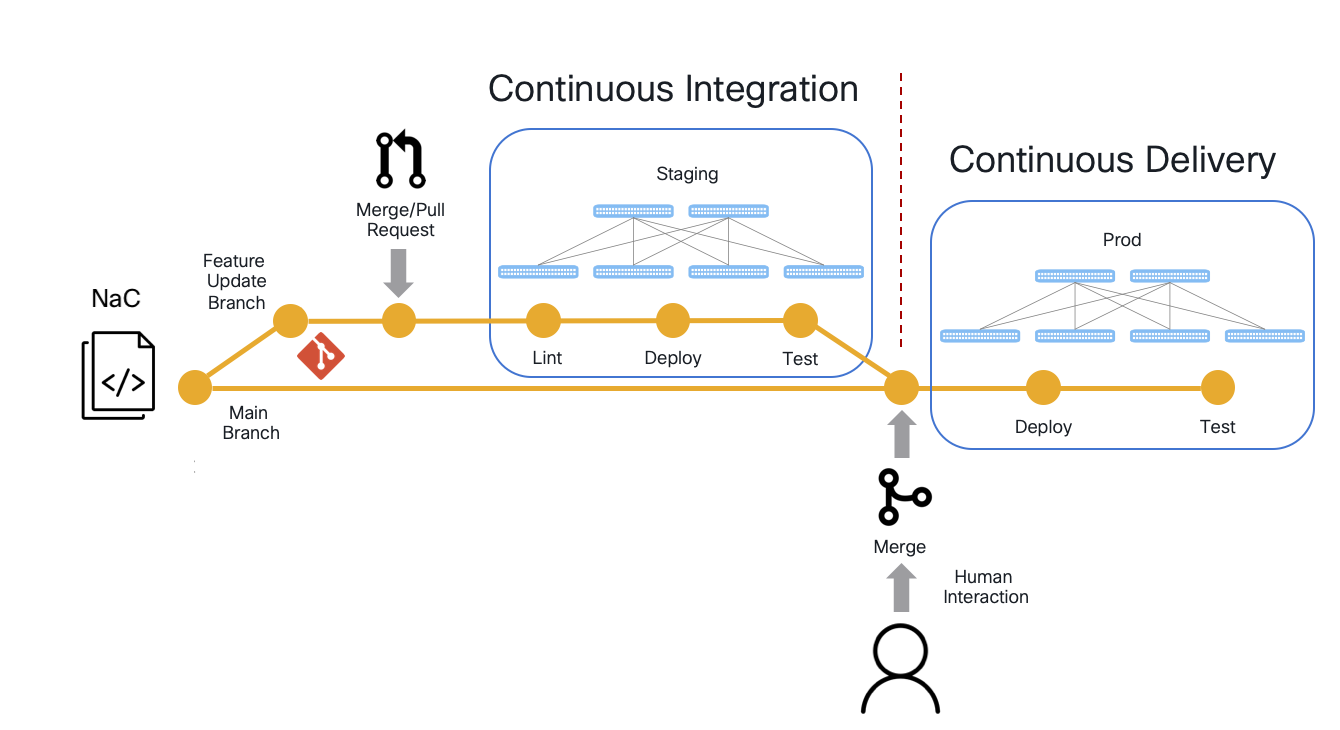
This section of the lab introduces you to the concept of NetDevOps, which is the idea of applying DevOps principles to network infrastructure and teams. First, you will explore GitLab and your Git repo's main branch. Then, you will create your config change branch to create your own CI/CD pipeline to deploy and test an NaC change to your test network. The first configuration changes you will make will be to deploy two Spines and two Leafs. Later in the lab, you will make additional configuration changes to add two more Leafs to your fabric. The CI/CD pipeline you will create in this lab will be configured to execute Robot Framework test cases in CXTM against your staging environment after applying the configuration changes to validate that the intended state of the network is achieved after the changes are made.
Upon the successful execution of this pipeline, your configuration change branch is ready to be merged to your main branch. This could perform one of two things: 1) Continuous Delivery (CD) where the pipeline is waiting on you to manually perform that merge through a merge or pull request process to in turn make and test the configuration changes to your production network (i.e. during a scheduled change or maintenance window), or 2) Continuous Deployment (also CD) where the pipeline would not wait for your interaction but instead, upon success of the configuration change and testing against your test network, automatically roll out the changes (and testing) to your production network.
You will use GitLab for version control of your NaC. A repository has been prepared for you to begin creating your data configuration files for the data center deployment.
Continue to the next section to login to GitLab and explore the NaC repository structure and contents.